Website Migration

Website Migration

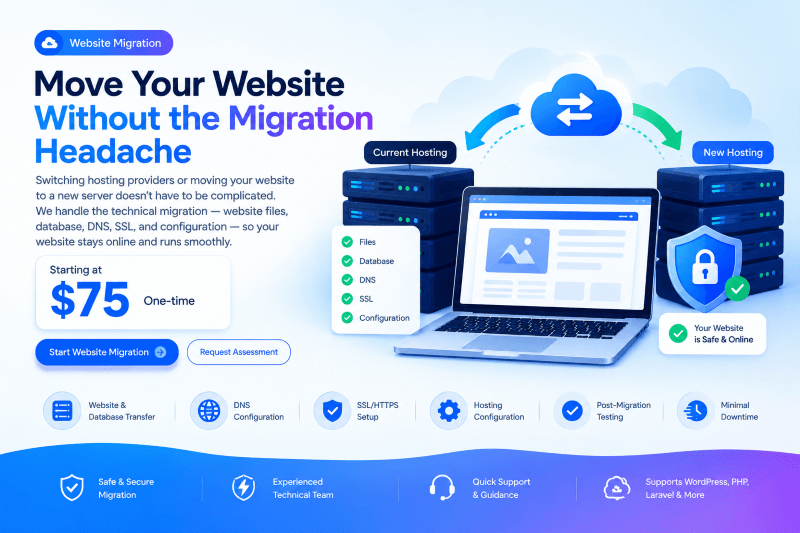
Move your website to a new hosting provider or server with professional migration assistance, including website files, database, DNS, SSL, configuration, and post-migration testing.

1–3 Business Days
24/7 Support
Expert Team

Starting at

$75.00
One-Time
  • Website File Transfer
  • Database Migration
  • Hosting Environment Setup
  • DNS Configuration
  • SSL / HTTPS Configuration
  • Website Testing

Overview

A Smooth & Secure Website Migration

Website migration involves more than copying files from one server to another.

A successful migration requires transferring website files and databases, configuring the new environment, updating domain settings, configuring SSL, checking application compatibility, and testing the website before considering the migration complete.

Our migration service handles the technical transfer and helps ensure your website continues working correctly after the move.

We support common websites built with WordPress, WooCommerce, PHP, Laravel, and other compatible technologies.

Trust Points

  • ✓ Website & Database Transfer
  • ✓ DNS Configuration
  • ✓ SSL/HTTPS Setup
  • ✓ Post-Migration Testing
  • ✓ Minimal Downtime

Customer Requirements

Before Migration

Customer should provide:

  • Existing hosting access
  • New hosting access
  • Domain/DNS access where required
  • Website administrator access where required
  • Database access where required
  • Details of the current website
  • Destination server information

Recommended

  • Recent website backup
  • List of important website functionality
  • Existing SSL information
  • Email provider information
  • Any special server requirements

Before We Start

Backup First

We recommend having a recent backup before starting any migration.

Keep Existing Hosting Active

Do not immediately cancel your old hosting account.

The existing hosting should generally remain active until the new website has been successfully tested and DNS has propagated.

DNS Propagation

After changing DNS records, some users may temporarily reach the old server while others reach the new server. This is normal during DNS propagation.

Key Benefits

Minimize Downtime We plan the migration to reduce unnecessary website downtime. Protect Your Data

Protect Your Data Backups help provide a recovery option before making significant changes.

Reduce Technical Complexity Our team handles the technical aspects of transferring files, databases, and configurations.

Preserve Website Functionality We test important website functions after migration.

Move to Better Infrastructure Upgrade from shared hosting to VPS or cloud infrastructure when your website requires additional resources.

Professional Assistance Avoid spending hours troubleshooting server and migration issues yourself.

What's Included

Website File Transfer
Database Migration
Hosting Environment Setup
DNS Configuration
SSL / HTTPS Configuration
Website Testing

Our Process

1

Migration Assessment

We review your current hosting environment, website size, technology, database, and destination server.

2

Backup

We create or verify a backup before starting the migration whenever technically possible.

3

Website Transfer

Website files and databases are transferred to the new hosting environment.

4

Server Configuration

We configure the required PHP, database, domain, permissions, and application settings.

5

DNS & SSL

We configure DNS and verify HTTPS on the new environment.

6

Testing

We test important website functionality and identify any migration-related issues.

7

DNS Switch

Once the new website is ready, the domain is pointed toward the new hosting environment.

8

Final Verification

We verify the website after the DNS change and provide a migration completion summary.

Frequently Asked Questions

Our standard website migration starts at $75. The final price depends on the website size, technology, hosting environments, and migration complexity.
A standard migration typically takes 1–2 business days. Larger or more complex websites may require additional time.
We aim to minimize downtime. The exact downtime depends on the website, hosting environment, DNS configuration, and migration method.
Yes. WordPress and WooCommerce migrations are supported.
Yes. Laravel applications can be migrated to compatible hosting or Linux server environments. Server requirements and configuration are assessed before migration.
Yes. We can migrate supported websites from cPanel to another compatible hosting environment.
Yes. We can help migrate supported websites from shared hosting to VPS infrastructure.
Yes. Database migration is included for standard websites using supported database systems.
We can configure SSL on the new hosting environment. Depending on the certificate and hosting provider, a new SSL installation may be required.
Email migration is generally not included in the $75 standard website migration. It can be quoted separately.
We can assist with DNS and domain configuration. Domain registrar transfers are separate from website hosting migration.
A properly executed hosting migration with the same domain and URLs should generally preserve the existing URL structure. We can check important URLs and redirects as part of the migration.
Yes, but large stores with extensive databases, orders, products, integrations, or high traffic require an individual assessment and quotation.
Where technically possible, we create or verify a backup before making significant migration changes.
We recommend cleaning a compromised website before migration. Malware removal can be provided as a separate service.

Request a Quote

Related Solutions

Need a Custom Solution?

Can't find the exact service you need? Our experts can help you out.
WhatsApp Chat